Friday, 15 March 2013

LinkedIn is #1 for Fast Growing Companies


Via Gawker via Marketing Profs


According to a new study at University of Massachusetts at Dartmouth, LinkedIn is currently the most used social media tool among the fastest-growing private companies.

In this study for the Center of Marketing Research, 81% of companies listed on the 2012 Inc. 500 (the fastest growing companies) use LinkedIn, up from 73% a year earlier. Meanwhile, the number of these companies using Facebook has actually declined to 67%. Twitter use is currently tied with Facebook, up from 64% in 2011. Foursquare, YouTube, and Pinterest lag behind, with a stalwart group of 8% who still refuse to get on the internet, dammit.

A majority of companies believe that social media is necessary. However, social media growth might plateau; 44% plan to spend more on social media this year, down from 71% who planed to increase spending in 2011.

This study was based on a nationwide phone survey of the companies named by Inc. Magazine to the 2012 Inc. 500 list (top ranked out of their 5000 list). 34% of these companies participated in the surveys.

Thursday, 14 March 2013

5 Tips for Facebook Marketers

Via AllFacebook


Let’s keep it simple. There are five things you should be doing on your Facebook pages to help ensure that you grow your fan counts, engage your fan bases, and ensure that those fans see your posts in their Facebook news feeds.

1. Provide Value


People love tips and helpful information. Give them useful nuggets and give them timely information.

As well, be sure to engage users by asking questions when you post on your Facebook pages. Once fans respond, keep them talking by asking related types of questions to drive conversation deeper. The more they engage, the better your Facebook page reach extends going forward with that fan.

TIP: If you need to post a news source that everyone else is posting, try to personalize your message and deliver it differently, not simply a share (regurgitation) of someone else’s information but add your own take and insight on the third-party article and post with your own image!


2. Be Responsive


Watch your page and answer posts fans make. There is simply no reason for not responding in a timely manner to posts and comments. There are all sorts of monitoring tools and third-party tools to alert you to comments and messages that can send you email alerts. Use these and respond. The more timely your response, the more fans will comment and return in the future! Care = Loyalty.

A study by the team at ExactTarget identified that the average response time by page administrators to comments was seven hours, and that 51 percent of the time, other fans jumped in to respond faster than brands. Do not let this happen to you. Respond to comments and likes on your page in a timely manner. Acknowledging the individual is a way to connect with them.


3. Post At Best Times For Your Audience


This is where your Facebook insights comes into play. Your “best times to post” are going to be driven by your industry (when your fan base is most likely to be on Facebook and most likely to engage) and, more specifically, by your audience (when are your fans on Facebook?). Facebook insights allows you to see interaction patterns for your pages over time.

General page post studies by larger companies such as Buddy Media have shown those posting outside of business hours had a 20 percent greater engagement rate than those only posting in the 9-5 daily work hour times. As well, a more recent Bitly study in May 2012 showed that traffic on Facebook begins to pick up at 9 a.m. daily locally, and begins to fade somewhat after 4 p.m. They noted that 11 a.m. can be a good time, in general, to reach people (11 a.m. for the user) in terms of visibility, but noted that engagement by users (taking a action to interact with your post such as like, comment, or share) happened best between 1 p.m. and 4 p.m.

While some of these reports can seem to have conflicting data and even polar opposite tips, the reality comes back to your industry and, most important, your very own page insights.

Your answer to these questions guides your Facebook page posting strategy:

When are your Facebook fans engaging with your posts?
When are you getting the most reach to your posts?
What type of posts (status, image, link, video) are getting the most engagement?


4. Posts With Images Drive More Engagement


We’ve all heard the saying, “A picture is worth a thousand words,” right?

On Facebook, a picture is worth much more than that! Images have been the No. 1 driver of engagement on a page since timeline launched. Images drive engagement more than links (which are the most used format of a post), more than video, and more than text-only status updates.

According to an internal Facebook study, ”Posts including a photo album or picture can generate two times more engagement than other post types.”

Images, both on desktop and mobile, now show prominently in Facebook users’ news feeds. So take your content from your blogs and learn to express it visually in images you can post on Facebook. See our step-by-step best practice guide for posting images to Facebook’s news feed.


5. Use Tab Apps To Drive Engagement


Last, but definitely not least, use custom tabs that offer something of value to your fans and that have social sharing built-in capabilities.

People like deals. Deals invite users to come and become fans.

Custom tabs that offer engagement and social sharing tools such as contests, sweepstakes, coupons, and deals can be a big booster of fan engagement, return fan activity, and reach for your page.

According to this RocketMedia infographic, 40 percent of Facebook page fans say they like businesses on Facebook in order to get promotions and discounts. One important consideration for tab applications is to use apps where users not only opt-in to email lists, but that require some type of social sharing. By adding an element of social sharing, fans then extend the reach of the promotion to their network, thereby adding a viral and significant growth element to promotion that enables it to reach far more users.

So, in this day, incentives work. Here’s the cycle visualized:
  1. Post offer to Facebook page news feed with an image, text less than 80 characters, and smart URL to tab app on page.
  2. Attract user to like your page with a like gate on tab app.
  3. Offer contests, sweepstakes, coupons on the tab.
  4. With offer on tab, capture email opt-in for future marketing.
  5. Enable easy sharing on tab to friends to extend reach.
  6. Repeat posting process next day at different key time.

BONUS Facebook Marketing Tips:


Here are a few extra tips to help your Facebook page create more engagement:

  • Pin posts you want people to see for a while – Pinning posts allows you to keep your more important messages at the top of your Facebook pages for seven days.
  • Highlight your best posts - Highlighting posts give you the opportunity to make certain things stand out more than others on your Facebook pages.
  • Promote posts that need to reach the masses - Promoting posts with Facebook’s promoted post ad tool gives businesses the opportunity to reach a much larger portion of their Facebook fan bases. You can often get 25 percent to 60 percent boosts with this for-pay Facebook tool.

Readers: Anything to add from your experience? Share in the comments below!


Wednesday, 13 March 2013

Surging Social Media Spending


Via FastCompany

Social media spending is set to more than double in the next five years across different business sectors.


Social media spending as a percentage of marketing budgets will more than double over the next five years, according to a Duke University survey of 468 U.S. chief marketing officers (CMOs).

Currently, CMOs surveyed spend 8.4% of their budgets on social media, but in the next five years that figure will reach 21.6%.

These huge increases in social media spending will be across different business sectors, including business-to-business (product), business-to-business (services), business-to-consumer (product) and business-to-consumer (services), the survey found.

The business-to-consumer (product) category, which includes companies like Procter & Gamble and The Coca-Cola Company, expects the most dramatic increase, from 9.6% to 24.6%.

The survey also found that Apple was once again was the top marketing company across industries, while P&G, GE, IBM, Coca-Cola and Google led their respective industries.

Does your company have big plans to increase social media spending? Tell us in the comments.

Tuesday, 12 March 2013

Inbound Marketing ROI


Via HubSpot


How long does it take to see results from inbound marketing? What kind of results will I see? What exactly leads to those increases? If you've been asking yourself those questions, have no fear:

The ROI Report is an analysis created in collaboration with HubSpot and MIT. By crunching numbers from our customers, we can not only get a perspective on the successes of our customers, but also a global view of how inbound marketing is working for businesses around the world right now.

These results come from a study based on data from 5,048 HubSpot customers and surveys from 236 knowledgeable professionals about their company's marketing strategy. Let’s jump right into the charts!

ROI of Inbound Marketing for Traffic

1) 92.34% of companies using inbound marketing increase their traffic.


We aren’t just making this stuff up! Real companies are seeing real world results with inbound marketing. 29.8% of companies using HubSpot have increased the traffic to their site more than 100%!


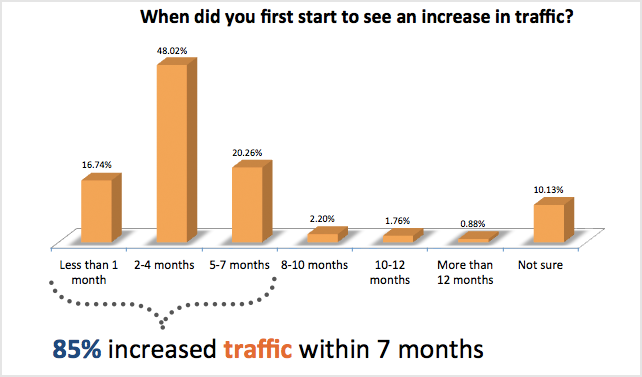
2) 85% of companies using inbound marketing increase traffic within 7 months.


We all know that inbound marketing takes time and patience to start seeing fruits from the labor. Surprisingly, customers started seeing increases far sooner than we typically talk about.


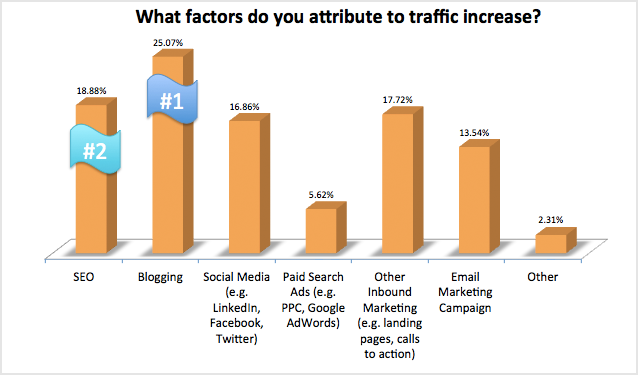
3) Blogging champions as the #1 method for increasing traffic, with SEO in second place.


This is an interesting stat that has changed since our 2011 ROI Report. In 2011, SEO was reported as the #1 method in increasing traffic. In 2013, SEO has fallen to second place with blogging taking the first spot. This is likely due to SEO today revolving largely around blogging to create fresh, unique content due to the Google Panda/Penguin updates.


ROI of Inbound Marketing for Leads

4) 92.7% of companies using inbound marketing increase their lead generation.


While companies have significantly increased their traffic using inbound marketing, they have seen an even greater increase in leads. 38.37% of companies using HubSpot have seen an increase in their leads of more than 100%!


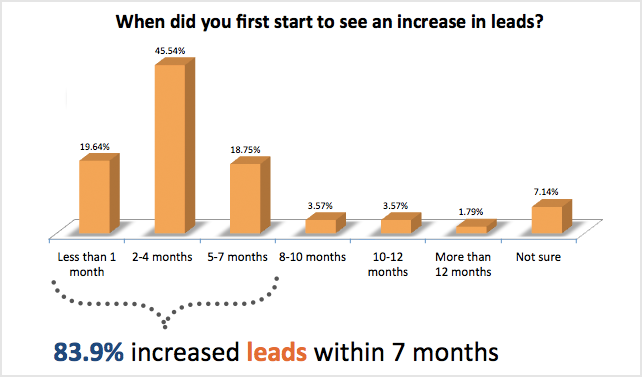
5) 83.9% of companies using inbound marketing increase leads within 7 months.


Companies today demand quick results from their investments, and here we see inbound marketing responding fast. All but only 1.79% of companies saw results within their first 12 months of utilizing inbound marketing methodologies.


6) "Other" inbound marketing techniques -- like landing pages and calls-to-action -- champion as the #1 method for increasing leads. Blogging comes in second place.


As we move from traffic to leads, we see MOFU (middle of the funnel) inbound marketing techniques like landing pages and calls-to-action reign supreme in driving leads. Blogging continues to prove itself as a powerful tool to be the second most popular method in increasing leads.


ROI of Inbound Marketing for Sales

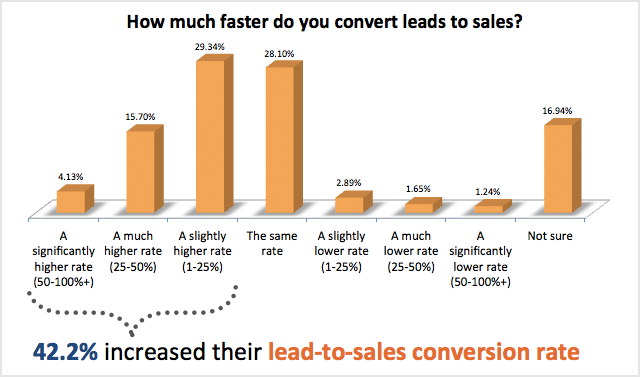
7) 42.2% of companies using inbound marketing increase their lead-to-sale conversion rate.


Most people will be attracted to inbound marketing to increase their traffic and leads. But who knew it could also optimize your lead-to-sale conversion? Inbound marketing makes you think through your entire sales funnel, and optimize each part effectively.


8) 49.7% of companies using inbound marketing increase sales within 7 months.


Increasing traffic and leads is an interesting statistic, but let’s get to the number we all as businesses truly care about: the bottom line. Companies using HubSpot software started to increase their sales and put real dollars into their cash-flow quickly. 63.24% of companies started to see increased sales within the first 12 months!


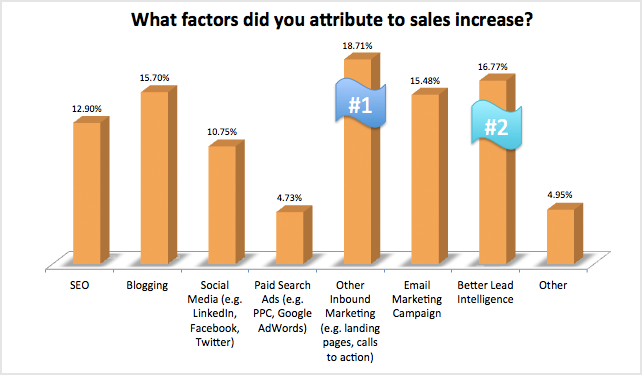
9) "Other" inbound marketing techniques -- like landing pages and calls-to-action -- are the number one reason marketers attribute to their increase in sales, with better lead intelligence not far behind.


Lead management, tracking, and intelligence tools are critical when you're increasing your sales funnel and bringing in leads. A centralized marketing database allows you to capture, store, and grow information about your leads effectively.

Monday, 11 March 2013

Social Media Budgets to Increase in 2013

Via E-Marketer

Two-thirds increasing spending on paid social media ads


Advertisers’ appetites for paid advertising on social media sites shows no sign of abating in 2013. According to a study conducted for digital brand measurement provider Vizu by Digiday, 64% of US advertisers planned to increase their paid social media ad budgets this year, with just 2% saying they intended to spend less money in 2013 than they did in 2012 on paid social ads.


Most of those increasing their spending on ads on social sites planned to do so by 10% or less. But a significant number were making even larger investments: 26% of respondents reported planning to increase their social media ad spending by 11% or more.

Seven in 10 respondents said they would spend between 1% and 10% of their online budget on social ads, suggesting that for most it is a present, but not a dominant part of the marketing mix. For 13% of respondents, however, it plays a larger role: This group spends 21% or more of their online budgets on paid social media advertising.


Overall, eMarketer estimates that US advertisers will spend $4.1 billion on paid social media ads this year, rising to $5 billion in 2014.

In terms of what marketers and agencies are hoping to get out of these social ads, the majority viewed them as primarily a branding tool to raise awareness and influence opinions of the brand.


Fewer advertisers and agencies used social ads as a pure direct-response tool to drive site visits or other actions, but 54% of agencies and 39% of advertisers reported using social ads to do some mix of branding and direct response.

Friday, 8 March 2013

Step-By-Step LinkedIn Company Profiles


Via Social Media Today

LinkedIn is an extremely useful tool for recruiting, job hunting and networking. Now with Company Pages, LinkedIn can also be used as a powerful tool and enhancement to your content marketing plan.

You may be asking yourself: do I really need a Company Page? Is this just another thing I need to check and update? The answer is yes and here’s why. As a business, you need to be where your current and potential clients are. As a consultant, thought leader or advisory service business, LinkedIn is where at least some of your clients are. You and your company’s content should be there. A LinkedIn Company Page should become a part of your social media and content marketing strategy, just as your Facebook Company Page and your Twitter account might be. It’s another important way (some would say more important than other social media outlets) to engage with your audience and help control the way your audience perceives you as a company.

To begin creating a Company Page you will need a valid email address with your company domain. You must also have this e-mail listed on your personal LinkedIn profile. Once you meet these requirements you can begin building your Company Page.

How-to Create Your LinkedIn Company Page


To start, log-in to your LinkedIn account and in the navigation bar, click on companies.



Once on the “Companies” page click “Add a Company” in the top right corner of the page.



The next page looks like this:


As I mentioned previously, you must have a valid email address with your company domain.

After you enter your information, click “continue” and begin adding and editing your company info!

Fill Out All Information

Once you have created your Company Page, start with the basics. Begin filling out all essential information, including: company name, description, your company’s website URL, specialties, products/services, industry, type, date founded, and your headquarters addresses.


SEO

Your LinkedIn Company Page is another place where use of search engine keywords and phrases is important. When filling out your description, specialties and products and services use the same keywords you use for your website. Also, make note of what keywords are being used in the competitive landscape, and change or enhance yours accordingly.

Logo & Cover Image

Your logo is already an essential element of your brand and as you need it on all other branding materials, you need it on your LinkedIn Company Page too! LinkedIn asks you to upload a standard logo and a square logo. The square one will be used as your image when you post any updates. Upload a banner or cover image. For this you can likely use an altered version of your Facebook cover image or graphic from your website. This space allows you to further communicate who you are as a company in a visual way beyond just your logo. A compelling cover image should inform, entertain and/or support the brand. Don’t forget that since your company’s description is at the bottom of the page, you should probably use the cover image space to include a message about who you are. A combination of your logo and a short message would be best.

Specialties

The Products/Services tab is very important because it’s where you can best “sell” what it is that you have to offer. Think of it as your Company Page’s very own catalog which details each product or service. Write compelling descriptions about your services that will draw customers in. What do you do and how do you help your customers? What is your unique selling proposition? Are you the only company in the industry that does what you do? Tell your audience that. Place your most important/most searched for or best selling product or service first because that’s the one that will be seen on the landing of your Company Page. You can also receive product and services recommendations for these listings (more on that later).

Careers

In the Careers tab you can add information about current job openings. You can list jobs for free, but with a paid Silver or Gold account you can add videos and images in addition to a text description. Additionally, you are able to customize a few different versions of your Careers page that will display relevant content for targeted audiences.

Employees as Brand Ambassadors

If they haven’t already done so, ask Employees to create LinkedIn accounts of their own and then link to your Company Page by listing it as their employer. By being linked to you, your employees will become your brand ambassadors. Anyone who goes to their profile will see who they work for and have the ability to check out your Company Page through them. Encourage all employees to completely fill out their profiles as well. When employees list your Company Page as their employer, their profiles will show up in the top right corner of your Company Page. It will show those who are viewing the Company Page how many employees you have and allow potential clients to essentially check out who they’ll be working with when they hire your company.

Employees as Administrators

Add all or add a select few. It depends on who you want to be able to access or edit your Company Page. Whoever has access to your other social media channels will probably need access to your LinkedIn Company Page as well.

You’re Not Quite Done Yet

When finished filling out everything you can, it’s time to begin pushing out content. In order to create a complete social media plan and reach every potential audience member, post on your LinkedIn Company Page everything you post on Facebook and Twitter. Some LinkedIn members who follow your page may be the same people following your other social media accounts, but some may only be on linkedIn! As will all content, make sure what you post on your LinkedIn Company Page is interesting, relative and shareable.



Promote More Effectively

Using Targeted Updates With LinkedIn you are able to create targeted updates. Use this feature to make some posts visible to only designated segments of your follower audience. You can filter by location, employee vs non-employee, company size, industry and function.

Promote Your New Company Page

Invite your connections on LinkedIn to follow your page. Post on Facebook, Twitter and your blog. Add a follow button on your website and blog. Include in your newsletter or just announce it in an email blast to your mailing list. You want as many of your connections as possible to come and follow your page.

Customer Reviews Are Gold

Use the products and services section to its full potential. Ask your LinkedIn connections for product and service reviews. LinkedIn members can write testimonials about your services which you can then display on your blog and other social media channels. Potential customers may judge whether or not to use your company based on reviews by others. Go a step further and in return, offer them an incentive such as 10 percent off their next service or buy one get one free of a product for their time drafting the review. People are more motivated to spend their time doing something when promised something in return!

Add LinkedIn’s Recommend button to your site to encourage visitors to give you recommendations and to interact with your Company Page.

Check Your Insights

The insights tab is visible to all administrators/employees with a company domain email. It shows the number of overall page views by tab per month and number of unique visitors per month. You can also see the number of clicks per month on each link on your products and services page and also your company’s followers per month according to industry, function and company. Be Consistent. As with anything in social media and content marketing, it takes time. You have to be very consistent in order for this valuable tool to pay off. Making your LinkedIn Company Page a part of your overall social media and content marketing plan and including it daily is the only way to use it. As with any social media tool, if you only sporadically use it, you cannot correctly judge whether or not it’s working. If you fill out your page completely and follow all steps above you can expect a valuable return from your LinkedIn Company Page in the weeks and months to come. Just remember, along with the use of relative and meaningful content, consistency is key.

Thursday, 7 March 2013

Using Vine as a Marketing Tool

Via jeffbullas.com 

Twitter is underwhelming at 140 characters. Any sane person would say “What do you do with that?”

Why limit yourself to so few words when there is a dictionary and an encyclopedia available and limitless communication at your disposal.

Its brevity is both an enigma and its charm. It has been its weakness and strength due to that simplicity.

Keeping it simple is not without success precedent.

One of the most successful children’s books of all time was written with only 50 words. It was a challenge thrown down to Dr Seuss by his editor when he was about to write his next book “Green Eggs with Ham“. To put this in perspective the previous book by Dr Seuss “The Cat in the Hat” was written with 236 words.

Simple is good.

The history of short and simple

Just over twenty years ago on December 3, 1992 the message “Merry Christmas” was sent by software engineer Neil Papworth to the Vodafone director Richard Jarvis.

That was the world’s first text message. It was short and it was simple.

Who would think that 20 years later that:
6 billion messages would be sent every day in the USA
2.2 trillion texts would be sent every year in the USA
8.6 trillion SMS messages would be created every year around the planet
Text messaging would be a $150 billion a year industry

It is the messaging of choice for most teenagers. The adults have also realized its time saving capabilities.

People have also understood that having a conversation is maybe not something you always want to do.
Twitter wants to transform video messaging

Twitter has just announced a smart phone app called “Vine” that allows you to take a video that is limited to 6 seconds and continues to loop.

It is not alone with the idea. There are competing apps called Viddy and Tout that do much the same.

So what can you do with a 6 second video and it raises this question again.

Why bother?


Maybe we shouldn’t be so quick to put the boot in. Twitter took texting to a new level and put it on steroids. Maybe a short and simple video is enough to get a powerful message out that is memorable.

Is less more?
How could you use Vine for marketing?

Viddy thinks that 15 seconds is the right length for a video short message while Vine has chosen 6 seconds. Maybe there is some science behind both but let’s look at some possible ideas for marketing with a short video.

Here are 6 ideas:


1. The brand elevator pitch


Want people to understand what your brand is all about. The elevator pitch is where you wrap it up in one sentence or two. 6 seconds is maybe enough.

How could you make it visual and viral.

2. Product demonstration


One to two minute video reviews of products in your online store are now maybe too long. Why not experiment with six seconds?

3. Launching a new product or service


Explain your new product in six seconds if you can. (If you don’t then use YouTube). Maybe your messaging will get better as you learn to communicate the key features and not the unnecessary.

4. Give your brand a personality


Social media allows and wants you to give your brand a personality. Use Vine to make it real and authentic. Make it quirky or innovative.

Many brands want an image that goes beyond bland.

5. Marketing a promotion


Use a 6 second Vine video to market a new promotion. This could be a new book, song or a movie or even an event. How long do you need to communicate something new. Remember the power of simple.

6. Announcing a special offer or discount


50% off. How long does it take to announce that special offer for your clothing store? Make it visual, aural and shareable.

If you want to look at how 15 businesses are using the Vine video app for their brand. Check out this post over at Hubspot.

What about you?


How do you think you could use a six second video on Vine to market your business and brand? Do you even want to?

Do you think this idea will stick or do you think it is a fad?

Look forward to your comments below. Tell us your thoughts and ideas.

Wednesday, 6 March 2013

A Facebook Cheat Sheet for Marketers

facebook post cheat sheet
Facebook Wall Post Cheat Sheet infographic designed by Linchpin Infographic Design

Tuesday, 5 March 2013

38 Totally Great Business Cards

Via Buzzfeed


1.


This card by "Another Bloomin' Designer" Jamie Wieck sprouts a mini plant after four days of soaking.
Via: yankodesign.com
2.


This fully operational business card demonstrates how transistors amplify current.
Via: aaronalai.com
3.


This DJ's business card reveals professional details as you spin the cardboard turntable.
Via: designshack.net
4.


The quintessential Jack of All trades. Who wouldn't hire this tiger-taming orgy-organizer?
Source: mattcutts.com / via: reddit.com
5.


Yoga One's business card was designed by Phil Jones, Ryan Coleman, and Jeff McCullough.
Via: cargocollective.com
6.


This mechanical engineer's business card-turned-catapult suggests there's more expertise where that came from.
Source: cdn.smosh.com / via: pelfind.com
7.


A Les Miserables-inspired card for the business of luuurrrve.
Via: emperorsnewblog
8.


When inserted into a USB port, this circuitboard business card reveals its creator's resume and cover letter. So efficient!
Via: geekologie.com
9.


Obviously all true.
Source: cdn.smosh.com / via: smosh.com
10.


To pre-empt doubts about pronunciation.
Via: dominicwarren
11.


The Riverside Saloon answers pressing nightlife questions.
Via: helenrogersdesign
12.


Just an awesome DIY balsa wood card/chair.
Via: stuff-on-things
13.


Where treats go, business (and obedience) follow.
Via: cardobserver.com
14.


This yoga instructor's bendy PVC card gives you a taste of what your muscles could be doing with her guidance. The card was produced by Kapil Bhimekar.
Via: cardonizer.com
15.


A miniature Mac marvel.
Via: stuff-on-things
16.


???
Source: i.imgur.com / via: reddit.com
17.


A business card that doubles as a caliper.
Via: designshack.net
18.

Via: pelfind.com
19.


Biscuit business cards are the Bombay Bakery's ultimate endorsement.
Via: blog.nextdayflyers.com
20.

Via: lovelystationery.com
21.


A professional circumciser's "tear-off" business cards. Ouch.
Via: amsterdamadblog.com
22.


A translucent photography business card.
Via: mustbeprinted.com
23.


This designer's card epitomizes "Show, don't tell."
Via: blog.robosborne.co.uk
24.


In case you need a visual.
Via: i.imgur.com
25.


He'll work those thumbs!
Via: i.imgur.com
26.


A guitar instructor's fretted business cards...
Via: tatianaaspinwall


...which double as chord flash-cards.
Via: tatianaaspinwall
27.


Doubtful, but intriguing.
Source: imgur.com / via: reddit.com
28.


This is theoretically the back of a "special business card" belonging to the mayor of San Leon, Texas. Clearly worth saving for emergencies.
Source: imgur.com / via: reddit.com
29.


A lovely token to keep at the ready.
Source: imgur.com / via: reddit.com
30.


Needless to say, this also would come in handy.
Source: i.imgur.com / via: reddit.com
31.


Will work for peanuts?
Via: smosh.com
32.

Via: i.imgur.com
33.


A plastic surgeon's unconventional advertising approach.
Via: i.imgur.com
34.


WTF?!?
Source: i.imgur.com / via: reddit.com
35.


An homage to Ghostbusters? Nailed it.
Source: i.imgur.com / via: reddit.com
36.


As all business cards should be.
Via: pleated-jeans.com
37.


Don't just take his word for it.
Source: imgur.com / via: reddit.com
38.


This business card = self-sabotage.
Via: i.imgur.com